Tricorder
For years, streaming services kept track of my listening for me. Every song, every album, every late-night repeat ended up in a history I never had to think about. Once a year, they turned that history into a recap: top songs, top albums, how much I'd listened.
That changed when I stopped using music services. I'm back to buying music, both digital and on physical media, and I self-host Navidrome to stream the files. Most of my listening now happens on a FiiO M21 DAP, or at my desk, with CDs or Navidrome through a desktop DAC. Either way, away from the phone.
It's a setup I'm happy with. But it came with one thing I didn't expect to miss: the stats. I like knowing what I've been listening to, which albums I keep coming back to, and how things shift over a year. Last.fm and ListenBrainz give me that, and not just once a year. They just need something to tell them what's playing, and when the music comes from a CD or a DAP, nothing on my phone knows.
So I built Tricorder.
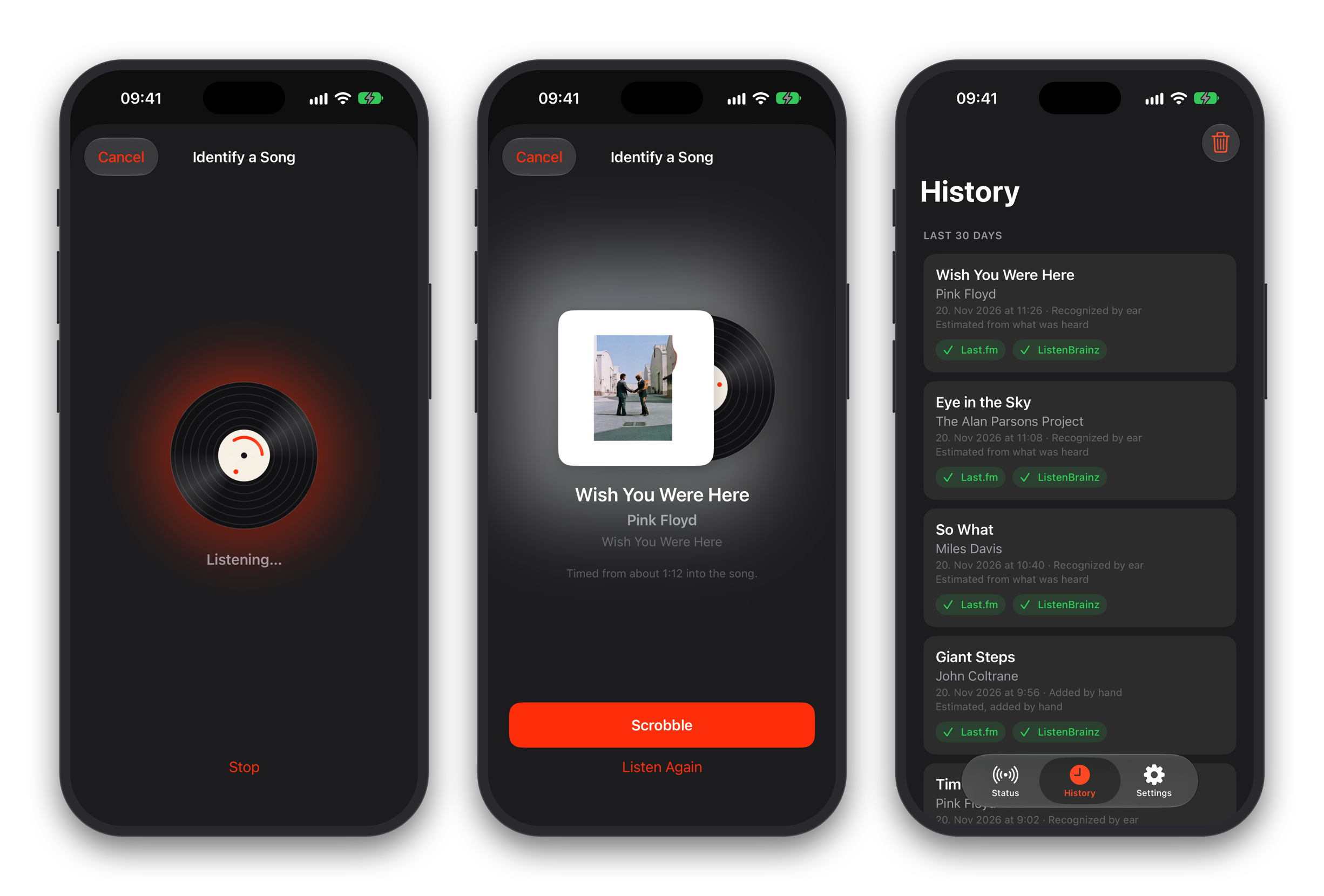
It's a small, free iPhone and iPad app that scrobbles music to Last.fm and ListenBrainz. It's niche, and I know it, made for a very specific group of people: those who listen to music outside a streaming service and still want their history.
Since the phone isn't the one playing, Tricorder listens. That was the whole idea: put a CD on, hold the phone near the speakers, and let it tell me what's playing. Then I decide whether it's worth a scrobble. With headphones on the DAP, though, there's nothing for the phone to hear, so I can also search Apple's catalog by name, even for albums I bought somewhere else. And since I buy albums, Tricorder scrobbles them that way too: I pick one, tick the songs I heard, and they're sent in order.
Nothing is scrobbled automatically, and that's on purpose. I wanted every scrobble to be something I chose, not something an app guessed on its own. So Tricorder doesn't watch a player, read a library, or run in the background. It keeps the last 30 days of plays, so I can see what went where, retry anything that failed, or trigger a new scrobble when I listen to the song again.
I also didn't want another app that knows more about me than it needs to. There's no account with me, no analytics, no ads, and no tracking. The microphone only listens while the Identify screen is open, and what it sends is an acoustic fingerprint, never the audio itself.
And the best thing about building my own apps is that I get to explore. Just because it's a small app with one or two features doesn't mean it needs to be boring. Tricorder was my excuse to play with animations, colors, and icons. While it listens, a record spins on screen as it tries to identify the song. Once it finds a match, the record gives way to the album cover, shown as a vinyl sleeve1. It ships with eleven app icons (the record on nine backgrounds, plus two Pride versions) and nine accent colors you can mix freely.
That's it. Tricorder is available on the App Store, for free. If you're one of the few people it was built for, I hope it's useful.
Yep, I'm very proud of this animation.↩